Menu actions
Add an item to the three dot menu for posts, comments, or subreddits. Menu actions can perform immediate client effects or trigger server processing followed by client effects.
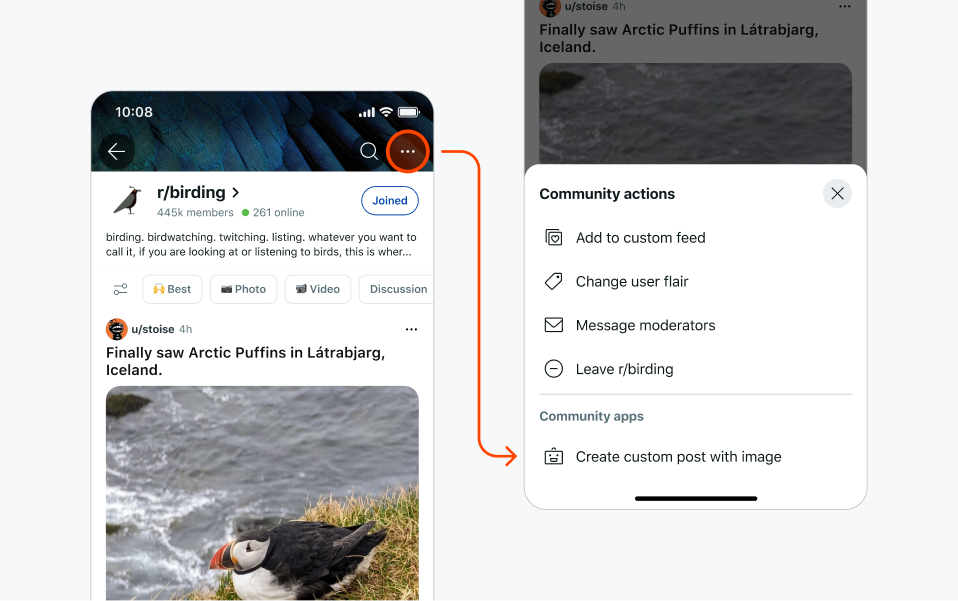
Basic menu actions
For most menu actions, use direct client effects. These provide immediate responses and are perfect for simple actions that don't require server processing.
Menu items defined in devvit.json:
{
  "menu": {
    "items": [
      {
        "description": "Show user information",
        "endpoint": "/internal/menu/show-info",
        "location": "post"
      }
    ]
  }
}
Simple endpoint with direct client effects:
- Hono
- Express
import type { MenuItemRequest, UiResponse } from "@devvit/web/shared";

app.post("/internal/menu/show-info", async (c) => {
  const _input = await c.req.json<MenuItemRequest>();
  // Simple actions don't need server processing
  return c.json<UiResponse>({
    showToast: "Menu action clicked!",
  });
});
import type { MenuItemRequest, UiResponse } from "@devvit/web/shared";

app.post<string, never, UiResponse, MenuItemRequest>(
  "/internal/menu/show-info",
  async (_req, res) => {
    // Simple actions don't need server processing
    res.json({
      showToast: "Menu action clicked!",
    });
  },
);
Supported contexts
You can decide where the menu action shows up by specifying the location property.
| Property | Values | Description |
|---|---|---|
| location (required) | comment, post, subreddit | Determines where the menu action appears. |
| postFilter (optional) | currentApp | Shows the action created by your app. The default is no filtering. |
| forUserType (optional) | moderator | Specifies the user types that can see the menu action. The default is everyone. |
For moderator permission security, when opening a form from a menu action with forUserType: moderator, the user initiating the action must complete all actions within 10 minutes.
Menu responses
In Devvit Web, your menu item should respond with a client side effect to give feedback to users. This is available as a UIResponse as you do not have access to the @devvit/web/client library from your server endpoints.
Menu items with server processing:
{
  "menu": {
    "items": [
      {
        "label": "Process and validate data",
        "endpoint": "/internal/menu/complex-action",
        "forUserType": "moderator",
        "location": "subreddit"
      }
    ]
  }
}
- Hono
- Express
import type { MenuItemRequest, UiResponse } from "@devvit/web/shared";

app.post("/internal/menu/complex-action", async (c) => {
  const _input = await c.req.json<MenuItemRequest>();
  try {
    // Perform server-side processing
    const userData = await validateAndProcessData();

    // Show form with server-fetched data
    return c.json<UiResponse>({
      showForm: {
        name: "processForm",
        form: {
          fields: [
            {
              type: "string",
              name: "processedData",
              label: "Processed Data",
            },
          ],
        },
        data: { processedData: userData.processed },
      },
    });
  } catch (error) {
    return c.json<UiResponse>({
      showToast: "Processing failed. Please try again.",
    });
  }
});
import type { MenuItemRequest, UiResponse } from "@devvit/web/shared";

app.post<string, never, UiResponse, MenuItemRequest>(
  "/internal/menu/complex-action",
  async (_req, res) => {
    try {
      // Perform server-side processing
      const userData = await validateAndProcessData();

      // Show form with server-fetched data
      res.json({
        showForm: {
          name: "processForm",
          form: {
            fields: [
              {
                type: "string",
                name: "processedData",
                label: "Processed Data",
              },
            ],
          },
          data: { processedData: userData.processed },
        },
      });
    } catch (error) {
      res.json({
        showToast: "Processing failed. Please try again.",
      });
    }
  },
);
Menu response examples
Menu responses can trigger any client effect after server processing:
Show toast after processing:
- Hono
- Express
return c.json({
  showToast: {
    text: "Processing completed!",
    appearance: "success",
  },
});
res.json({
  showToast: {
    text: "Processing completed!",
    appearance: "success",
  },
});
Navigate after data fetching:
- Hono
- Express
const post = await reddit.getPostById(postId);
return c.json({
  navigateTo: post,
});
const post = await reddit.getPostById(postId);
res.json({
  navigateTo: post,
});
Chain multiple forms:
- Hono
- Express
// First form response leads to second form
return c.json({
  showForm: {
    name: 'secondForm',
    form: { fields: [...] },
    data: { fromStep1: processedData }
  }
});
// First form response leads to second form
res.json({
  showForm: {
    name: 'secondForm',
    form: { fields: [...] },
    data: { fromStep1: processedData }
  }
});
Limitations
- A sort order of actions in the context menu can't be specified.
- The context, name, and description fields do not support dynamic logic.