Best Practices
Push notifications can help drive engagement, increase player retention, and build habit loops for players—all good things for your game. The examples below are from Syllo, a word game that integrated Push Notifications into the game experience.
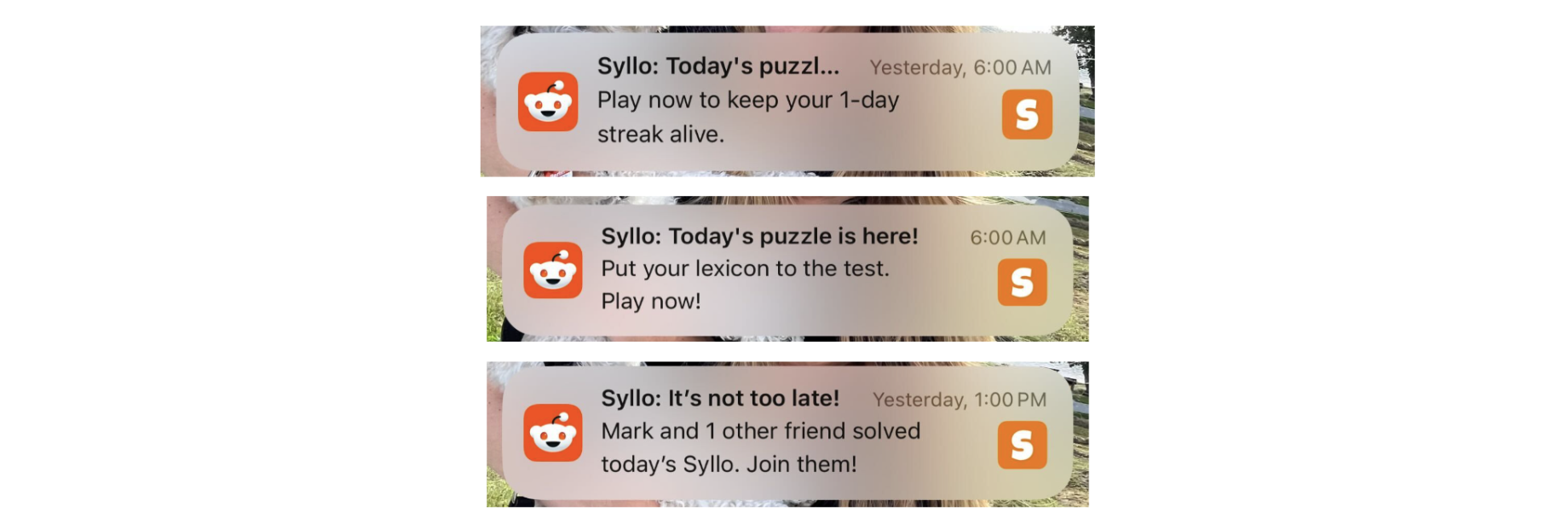
This guide provides instructions for implementing developer-authored push notifications for Reddit games.
This is currently an experimental feature, and you'll need to apply for a spot in our beta program to implement push notifications in your app.
How it works
Push notification copy review
All push notifications in this Beta must be pre-approved by Devvit admins to ensure alignment with Reddit’s notification standards and content policy (see Effective Copy for tips!).
The Devvit team will review and approve all submissions before activation to ensure a safe and consistent experience across games.
Notifications should be:
- Time-sensitive or highly important (e.g., a new puzzle is available, a live event is starting, a challenge has ended).
- Respectful and Reddit-appropriate, avoiding spammy, click-bait, or overly promotional language.
- Short and clear — titles ≤ 60 characters, body ≤ 100 characters.
- Transparent about the context of the notification (what the user will see when they tap).
You can send a maximum of two push notifications per day per user.
Opt-in / opt-out UX
Push notifications are opt-in only. and this is enforced at the API level. In the future, additional opt-out controls will also be available in Reddit settings.
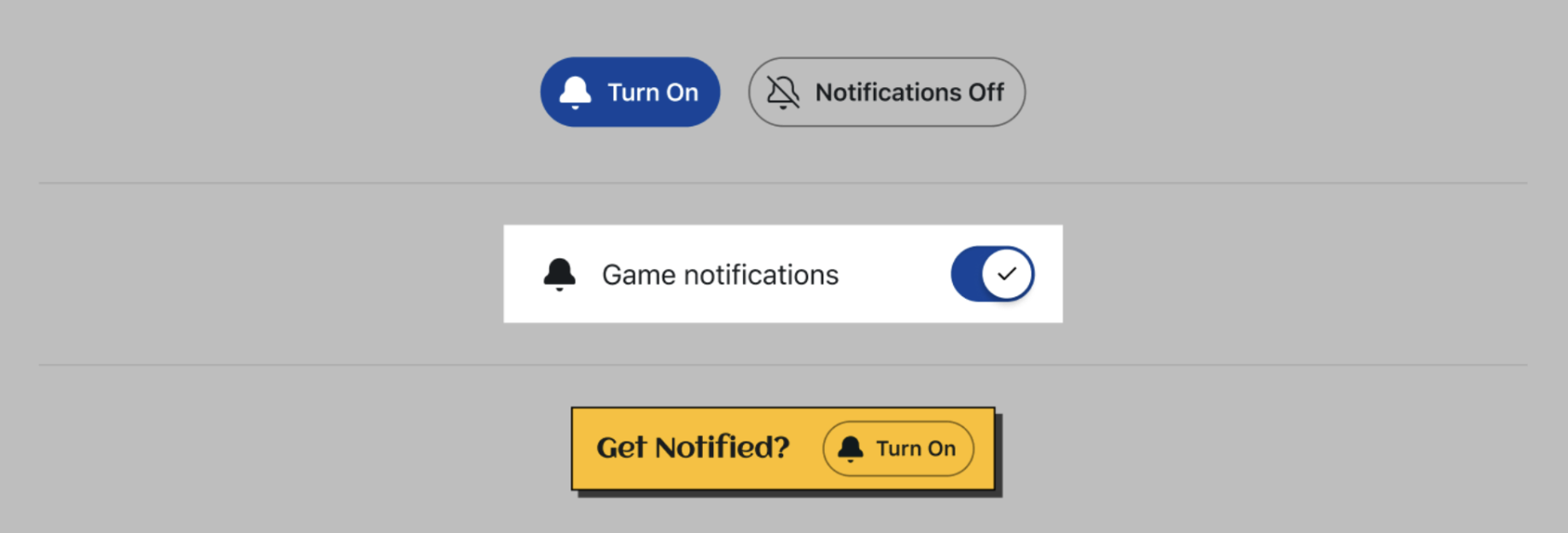
Games must provide an in-game notifications control that:
- Allows users to explicitly turn notifications on and off
- Clear text indicating the user’s current state (on or off) on the initial screen
UX best practices
- Use Reddit’s notification-on and notification-off icons
- Clearly indicate if game notifications are on or off
- Always provide an easy way to toggle on or off notifications from your initial app view or a settings page
- Show visual confirmation of actions, like adding a “Notifications enabled” toast or change to the button styling
Component examples
Designing high-quality notifications
Push notifications are most effective when strong content and strong copy work together. High-quality messages start with meaningful in-game events and use clear, motivating language to bring that value to life.
Create meaningful events
Your push notifications should deliver clear, immediate value to players.
- Make player progress visible. Streaks make player progress tangible and gives players a clear, low-effort goal: show up, keep the streak alive, and continue progressing. Make sure to include the number of days in the streak. This makes the player’s progress concrete and strengthens their motivation to return to keep it going.

- Provide tangible player benefits. Tie notifications to real outcomes, like rewards ready to claim, streak milestones, live games, or limited-time challenges. Give the user a clear payoff for returning to the game. High-value events drive high conversion. If there’s no clear payoff, it’s better not to send the notification at all.

- Layer urgency onto broadly relevant moments. Create momentum by promoting events that are time-sensitive (“happening now” or “ending soon”) and matter to a wide audience, like a daily puzzle going live or the final hour of a tournament.

- Treat pushes as a limited resource. Use notifications selectively for moments where value is obvious at a glance, like completing a weekly challenge, collecting a reward, joining a live match, or entering a newly unlocked mode. These are the moments most likely to drive immediate play and long-term retention.
Optimize timing
Send push notifications when players are most likely to engage with your game.
-
Localize delivery by user time zone
- Schedule sends using the player’s local time, not a single global batch time.
- Treat night-time sends as disallowed by default; players are more likely to mute or opt out if they’re woken up or interrupted late.
-
Aim for late afternoon to early evening
- Platform data shows peak PN opens in late afternoon and early evening by GEO. Use this as the default window if you don’t have game-specific signals.
- Start with a conservative window like 16:00–21:00 local time, then refine based on your game’s metrics (CTR and disable rates).
-
Align timing to moments of natural intent
- For streak reminders, send close to when players typically play (e.g., a few hours before their usual daily play time), not as a “last second” midnight panic.
- For event and reward PNs, send:
- Shortly before the value becomes available (e.g., event starting soon, reward about to unlock), or
- When the value is immediately redeemable and you can deeplink straight into the relevant screen.
- Avoid “just because it’s morning” or daily cron-style sends; timing should always correspond to a clear in-game reason to come back right now.
-
Use timing metrics to iterate
- Track CTR by hour-of-day and day-of-week in local time buckets for your game.
- Watch notification disable rates after bursts of sends; spikes usually mean you’re hitting players at the wrong time (too early, too late, or too often).
- If you don’t have enough volume for fine-grained experiments, stick to:
- No night-time delivery
- Late afternoon/evening windows
- Only sending when a concrete, time-bound value is available (streak, event, reward).
Write effective copy
Push notifications act as motivational nudges that get to the crux of why users are playing your game. Here are some ways you can incorporate these nudges into your game.
-
Add behavioral triggers. Behavioral triggers respond to real user actions, like completing tasks, returning after a break, or reaching milestones. This makes each message feel timely and personal. Examples might include:
- “You’re 1 game away from finishing your weekly challenge!”
- “You were in the top 5% last week—can you do it again?”
- “You have 2 new puzzles waiting for you!”
-
Engage with social dynamics. Highlighting status changes and community milestones inspire connection and friendly competition. Examples might include:
- “Your team just moved up a division! Jump in to keep the momentum going!”
- “Someone just stole your place on the leaderboard. Want it back?”
-
Leverage personal motivation. The user’s history with the game reinforces progress. Examples might include:
- “Your crops are thriving! Come collect your rewards!”
- “You’re close to genius rank! Solve 3 more puzzles to claim your crown!”
- “You’re one mission away from unlocking your next rank! Time to jump back into action!”
To learn more about creating deeper engagement loops, check out the best practices for building community games.
Adding push notifications to your app
Step 1: Update the push notification module
In your terminal, navigate to your project directory and run this command to update the push notification to the latest release.
npm install @devvit/notifications
Step 2: Import the push notification module
import { notifications } from '@devvit/notifications';
Note: If you already have the PN module, enter
npm install @devvit/notifications@next to get the latest version.
Step 3: Use bulk push notification endpoint with templating
To send a push notification to a group of users, you can use the double curly brackets ( { { } } ) to reference variables in a Mustache template.
await notifications.enqueue({
  title: 'Hello {{name}}!',
  body: 'You have {{score}} new points.',
  recipients: [
    {
      userId: 't2_abc123',
      link: 't3_xyz987',
      data: {
        name: 'Alex',
        score: '42',
      },
    },
    {
      userId: 't2_def456',
      link: 't3_xyz987',
      data: {
        name: 'Jordan',
        score: '7',
      },
    },
    {
      userId: 't2_ghi789',
      link: 't3_xyz987',
      data: {
        name: 'Sam',
        score: '13',
      },
    },
  ],
});
Note: Mustache templating is optional. Here's a simplified example without it:
await notifications.enqueue({
  title: 'Winner!',
  body: 'Congrats on your win',
  recipients: [
    {
      userId: 't2_abc123',
      link: 't3_xyz987',
    },
  ],
Note: If the app hasn’t been published, you can only send push notifications to yourself for testing. Pre-release apps in testing are not subject to the rate-limits below.
Once your app is published, you can pass different data per user for the same template. For each app, you can send:
- 2 push notifications per user per day*
- Up to 25K per app per day
If you need higher limits, let us know.
Step 4: opt-in / opt-out
Users will be able to opt in or out of receiving notifications triggered by a button in your UI:
await notifications.optInCurrentUser();
await notifications.optOutCurrentUser();
You will also be able to retrieve a list of users who have opted in (if not managing it manually):
//This will just return the first 1000 users
const recipients = await notifications.listOptedInUsers();

const recipients = await notifications.listOptedInUsers({
  after: '1764876078573:t2_ltrlsg7l',
  limit: 100,
});
The default and maximum limit is 1,000.
Usernames are returned in chronological order according to opt-in time, starting after the specified cursor. If the cursor is not found, results begin from the earliest opt-in time.